rullino
rullino




Photo edits you describe once, as JSON: preview them live on the GPU in the browser, replay them on the CPU anywhere, with output that agrees within a published per-filter tolerance. TypeScript, WebGPU, MIT, zero runtime dependencies.
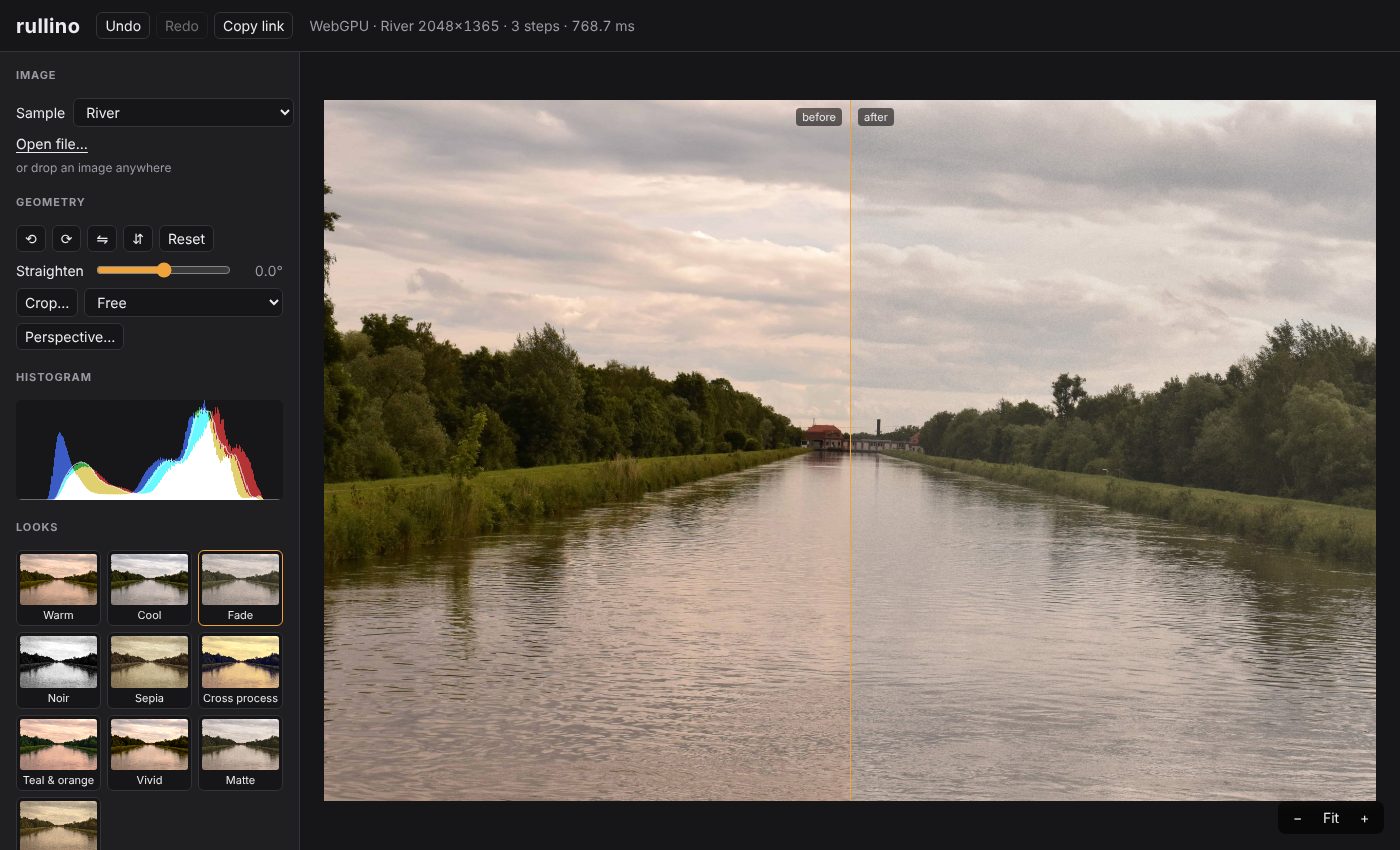
rullino spans the arc from classic computer-vision operations (thresholds, convolutions, Canny edges, morphology, median, bilateral, CLAHE) to photo-app adjustments and looks (exposure, curves, white balance, LUT-based "insta" presets, vignette, grain), with a few optional AI tools. A companion playground lets you load a photo, chain filters and tweak their parameters live: try it · API reference. Photos are processed on your machine and never uploaded.
Quick start
npm install @rullino/core @rullino/filters
Edit a photo on the GPU and draw it on a canvas:
import { createGpuContext, importImage, Pipeline, readSrgb8 } from '@rullino/core';
import { contrast, exposure, vignette } from '@rullino/filters';
const ctx = await createGpuContext(); // throws WebGpuUnavailableError without WebGPU
const photo = await createImageBitmap(await (await fetch('photo.jpg')).blob());
const pipeline = new Pipeline(ctx);
pipeline.setSource(importImage(ctx, photo));
const out = pipeline.run([
{ filter: exposure, params: { ev: 0.3 } },
{ filter: contrast, params: { amount: 0.15 } },
{ filter: vignette }, // defaults: a soft darkening of the corners
]);
const canvas = document.querySelector('canvas')!;
[canvas.width, canvas.height] = [photo.width, photo.height];
canvas.getContext('2d')!.putImageData(new ImageData(await readSrgb8(ctx, out), photo.width, photo.height), 0, 0);
Call pipeline.run again with new params when a slider moves: shaders are compiled once and only the steps after the change are recomputed. TypeScript users also want npm install -D @webgpu/types.
The same edit is plain JSON, and every filter has a CPU implementation that the GPU is tested against, so the edit can be stored, sent and replayed anywhere, Node included:
import { applyEdit, createImage, serializeChain } from '@rullino/core';
import { contrast, exposure, filters } from '@rullino/filters';
const edit = JSON.stringify(serializeChain(
[{ filter: exposure, params: { ev: 0.3 } }, { filter: contrast, params: { amount: 0.15 } }],
{ output: { format: 'png', longSide: 2048 } },
)); // '{"version":2,"steps":[{"filter":"exposure","params":{"ev":0.3}},...],"output":{...}}'
const image = createImage(2, 1, Float32Array.from([0.1, 0.2, 0.3, 1, 0.4, 0.2, 0.1, 0.5])); // linear, premultiplied RGBA
const result = await applyEdit(image, JSON.parse(edit), { filters }); // CPU; pass { gpu: ctx } to render with WebGPU
GPU and CPU agree within a tolerance each filter declares: see the parity table. On a server, @rullino/node renders the same documents with the same shaders through Dawn (falling back to the CPU reference); CI renders every look and mixed edits on Chromium's WebGPU and on Dawn in Node and checks they agree. In the browser, @rullino/web does the same with one call: WebGPU when the browser has it, otherwise the fast CPU path in a Web Worker (a few hundred ms for a 1 MP preview, a few seconds for 12 MP). For a Konva canvas, @rullino/konva edits a Konva.Image in place: previews at the size on screen, full-resolution export.
Status: 0.x, the API may still change between minor versions. What exists:
- Core: schema-driven parameters,
defineFilter(), filter chains with pointwise fusion and incremental recompute, masks, geometry (crop, perspective, straighten), 3D LUTs, export to PNG (8/16-bit), JPEG and WebP, edits as JSON.- Filters: adjustments (exposure, curves, levels, white balance, colour mixer, grading...), convolutions, edges (Canny, Sobel / Scharr / Prewitt, Laplacian), thresholds, morphology, median, bilateral, histogram equalisation / CLAHE, inpainting, stylize (halftone, dither, Kuwahara, bloom...), lens blur.
- Presets: ten looks built from a LUT recipe, vignette and grain.
- ML (optional,
@rullino/ml): click-to-select objects (SlimSAM), object removal (MI-GAN) and depth for lens blur (Depth Anything V2 Small), with ONNX Runtime passed in by the caller.- Renderers:
@rullino/web(WebGPU, else the CPU in a Web Worker),@rullino/node(Dawn, else the CPU),@rullino/konva(aKonva.Imageedited in place).- Playground: chain editor, masks (brush, wand, Object), zoom, undo / redo, share links, Code (the edit as JSON and as code for the browser, Konva or Node).
Input is 8-bit sRGB (what the browser decodes); not done yet: Hough and other analysis filters, video input. See PLAN.md.
Why
Image processing in the browser is well served by general tools; what is missing is a WebGPU-first, typed filter library with a specification you can test against. The closest alternatives, by what they are built for:
| Library | Approach | Note |
|---|---|---|
| OpenCV.js | WASM, CPU; broad computer-vision toolkit | Much wider scope than filters; no GPU path in current releases |
| glfx.js | WebGL 1 filters | Last npm release 2016, last commit 2022 |
| CamanJS | Canvas pixel manipulation (CPU) | Marked no longer maintained in 2020; last npm release 2013 |
| pixi-filters | Filters for PixiJS (WebGL; WebGPU through Pixi v8) | Meant to be used inside a Pixi scene |
| three.js / Babylon.js post-processing | Scene-graph post-process nodes (WebGPU or WebGL) | Built for 3D rendering |
| Jimp, sharp, wasm-vips, magick-wasm | CPU image processing (JS, native or WASM) | Server-side or batch oriented; no GPU |
| Fabric.js, Konva | Canvas libraries with built-in filters | Object model first, filters second |
| small WebGPU filter repos | Demos and single-purpose tools (for example LUT-only) | Not published as general libraries, as far as we could find |
rullino is modern, typed, composable and GPU-first, with zero runtime dependencies: every filter is a WebGPU compute shader and a plain TypeScript reference, tested against each other; filters chain into fused shaders; masks, geometry, 3D LUTs and export are part of the same model. The trade-off is that it needs WebGPU (no WebGL fallback). Comparison last checked in October 2026; corrections welcome.
Design highlights
- Two implementations per filter: a WGSL compute shader (fast) and a plain TypeScript CPU version (reference). Tests check GPU ↔ CPU parity pixel by pixel, within a tolerance each filter declares and the parity table publishes (not bit-identical: the GPU keeps intermediates in float16); the CPU path doubles as a fallback.
- Correct color: linear
rgba16floatinternal pipeline, sRGB decode/encode at the edges, OKLab/OKLCH for perceptual adjustments, premultiplied alpha. - Schema-driven parameters: each filter declares typed parameters with ranges and defaults; the playground UI, validation and URL serialization are generated from them.
- Looks are data: Instagram-style filters are presets built from a 3D LUT engine plus vignette and grain.
- Pass graph: consecutive pointwise filters are fused into one shader; changing a parameter only recomputes downstream nodes.
Layout
packages/
core/ WebGPU device, texture pool, pass graph, color conversions, I/O
filters/ one module per filter: schema + WGSL + CPU reference
presets/ looks = LUT + parameters
ml/ optional ML tools (select, remove, depth); ONNX Runtime is passed in, never imported
node/ Node renderer: edit documents on Dawn (the webgpu package), CPU fallback
web/ Browser renderer: WebGPU, else the CPU in a Web Worker
konva/ Konva adapter: a Konva.Image edited with edit documents
apps/
playground/ Vite demo site
bench/ comparison page against PixiJS, Photon, wasm-vips (#77)
docs/ TypeDoc API reference
examples/ one-file examples on the published packages (StackBlitz links)
Documentation
- Filter reference: every filter with its parameters, ranges and defaults, generated from the schemas.
- Parity table: how far GPU and CPU output may differ, per filter.
- Per package: core, filters, presets, ml, node, web, konva. Examples: Konva photo editor (StackBlitz). Their
tsexamples are type-checked against the sources. - PLAN.md for the design and roadmap, CLAUDE.md for conventions and the reasoning behind decisions.
Development
Requirements: Node.js ≥ 22.12, pnpm 10, a browser with WebGPU (recent Chrome/Edge, or Safari/Firefox with WebGPU enabled).
pnpm install
pnpm dev # playground at http://localhost:5173
pnpm typecheck
pnpm test # unit tests (Node)
pnpm test:browser # GPU tests in headless Chromium, incl. GPU <-> CPU parity
pnpm build
pnpm test:e2e # smoke test of the built playground
pnpm test:coverage # unit + browser tests with coverage thresholds
pnpm test:ml # the real ML models on ONNX Runtime WASM (downloads ~69 MB once)
Browser tests need Playwright's Chromium (pnpm exec playwright install chromium). WebGPU runs on SwiftShader when no GPU is present, so they also work in CI.
See CLAUDE.md for conventions and the reasoning behind key decisions.
License
MIT. The ML models are downloaded at run time under their own licences, see THIRD_PARTY_NOTICES.md.